| What the name means | "Find the cumulative probability level for a given deviate value from a distribution"
| | Syntax | CumProb ( Deviate, DistMin, DistMid, DistMax, DistType, [ClipTailLevel] )
| | Description | Given a value of a deviate from a specific distribution, the function returns the cumulative probability associated with that value. This function is the opposite of Distribution.
| | Volatility | This function is termed 'volatile', which means it recalculates whenever the worksheet is recalculated, regardless of whether any of its inputs have changed. See Volatility.
|
| Variable | Type or Value | Description |
|---|
Inputs: (6)
|
| 1
| Deviate
| Float
| A value belonging to the distribution
|
| 2
| DistMin
| Float
| Minimum Point of a Distribution (either p=0 or as defined for the distribution type DistType)
|
| 3
| DistMid
| Float
| Mid Point of a Distribution (either p=0.5 or as defined for the distribution type DistType)
|
| 4
| DistMax
| Float
| Maximum Point of a Distribution (either p=1 or as defined for the distribution type DistType)
|
| 5
| DistType
| Real Integer
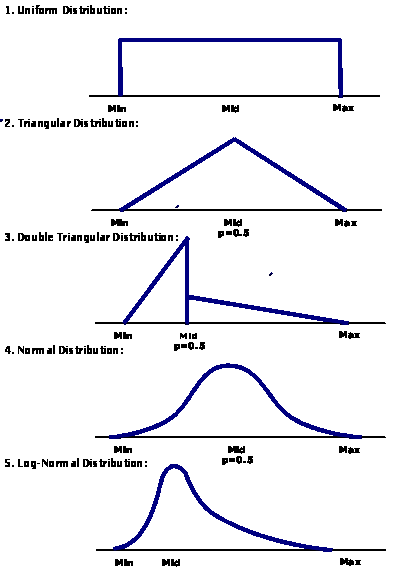
| Distribution type(1=uniform, etc - see variable detail for values)
|
| 6
| ClipTailLevel
| Float (Optional)
| An optional parameter for clipping the infinite tail distributions (normal, lognormal etc) so that probability levels in the clipped area round to 0 or 1 as appropriate. eg ClipTailLev=.01 means that a probability of .995 is rounded to 1.
(Optional)
|
Output:
|
| Return Value
| Result
| Float
| The result of the function, expressed as a number.
|
Defaults and Values The variable(s) of this function have certain defaults and/or switch values associated with them. Click here to see more. | Type of Value | Value | Description | Detail | | Default(s)
| DistType | 1 | Uniform Distribution
| | ClipTailLevel | 0 | Zero probability tail clipping | | Switches
| DistType | 1 | Uniform Distribution
| | | 2 | Triangular Distribution
| | | 3 | Double Triangular Distribution
| | | 4 | Normal Distribution
| | | 5 | Log Normal Distribution |
Examples | - Preview of the CumProb example.
- The above spreadsheet can be accessed from the Quick Reference (on the Business Functions menu), on the Examples menu, or in the Business Functions\Component Examples directory
|
|